




Welcome

Automation, Networking, and Cybersecurity.

I work across frontline support, infrastructure troubleshooting, and the networking layers underneath, handling day-to-day issues across systems, connectivity, and device management while building small automation tools in my own time to reduce routine admin work.

Working focus Windows endpoint support, NOC monitoring, Cisco network management, and cloud network administration
Current role IT Service Desk Advisor at Trust Systems
Windows endpoint support Windows Server and Active Directory PowerShell, Bash, and Python Cisco Meraki and PRTG SOTI and Apple Business Manager Cloudflare Pages and Access

About Me

I'm Vik, an IT Service Desk Advisor at Trust Systems, an MSP based in Cirencester. My work spans frontline support, infrastructure troubleshooting, and the networking layers underneath, covering systems, connectivity, and device administration. Much of that work comes down to structured troubleshooting, accurate incident ticketing, and knowing when an issue needs to be escalated cleanly. In my own time, I build small automation tools to reduce routine admin work and make repeat fixes easier to apply.

Current Role IT Service Desk Advisor at Trust Systems
CompTIA Certified PenTest+, Security+, Network+, A+
Chemistry Graduate I graduated in Chemistry from the University of Warwick in 2024 and worked as an Analytical Chemist at Campden BRI. After five months, I decided to transition into IT, where my skills and approach were a better fit.

Experience Snapshot

My work covers user support, infrastructure platforms, and the network paths that connect them. The common thread is structured troubleshooting, accurate incident ticketing, and steady escalation when an issue needs to move on.

Automation Workflow

In my own time, I build small workflows for repetitive admin tasks so the output is clearer, the steps are easier to repeat, and routine fixes are less dependent on memory.

PowerShell

A compact Windows recovery sequence that groups cache cleanup, integrity checks, image repair, disk checks, and Explorer restart into one repeatable support pass.

# Cached thumbnail reset & DISM/SFC checks
Get-ChildItem "$env:userprofile\AppData\Local\Microsoft\Windows\Explorer" -Filter "thumbcache_*" | Remove-Item -Force
sfc /scannow
dism /online /cleanup-image /restorehealth
chkdsk C: /f /r
Stop-Process -Name explorer -Force; Start-Process explorer.exe

Linux

system-refresh brings Debian and Ubuntu maintenance into one logged command, wrapping package repair, service health, journal review, trim operations, Docker checks, and a final summary into one repeatable pass.

#!/usr/bin/env bash
# system-refresh (Debian/Ubuntu + systemd)
set -u
set -o pipefail

LOG_DIR="/var/log/system-refresh"
TS="$(date +%Y%m%d-%H%M%S)"
LOG_FILE="$LOG_DIR/system-refresh-$TS.log"

: "${ENABLE_UPGRADE:=1}"
: "${ENABLE_DOCKER_CHECK:=1}"
: "${ENABLE_SMART_CHECK:=0}"

run_step() {
  local name="$1"; shift
  echo; echo "===== $name ====="
  "$@" || true
}

run_step "APT: update" apt-get update
run_step "DPKG: configure pending" bash -c 'dpkg --configure -a || true'
run_step "APT: upgrade" apt-get upgrade -y
run_step "Disk: fstrim -av" fstrim -av
run_step "Docker: disk usage" docker system df

echo; echo "Log saved to: $LOG_FILE"

CLI output control

A small shell detail I use in personal workflows is output redirection, depending on whether I want live terminal output or a silent run that relies on the script log.

Without redirection sudo system-refresh

Dumps service checks, package activity, Docker status, and the final summary to the terminal while still writing the log file.

With redirection sudo system-refresh >/dev/null 2>&1

Runs silently by discarding standard output and standard error. The command still runs, and the script log is still written separately.

Practical shell patterns

The same approach carries across other day-to-day admin tasks: decide whether the goal is visibility, logging, filtering, or quick triage, then shape the command around that.

Live output and log copy sudo system-refresh | tee refresh.log

Shows the command output in the terminal while writing a copy to a local log file for review afterwards.

Journal filtering journalctl -p warning..alert --since "24 hours ago"

Filters the journal to higher-severity entries when I need a shorter view of recent warnings and errors.

Quick incident triage systemctl --failed && docker ps --format "table {{.Names}}\t{{.Status}}"

Gives a fast first pass on failed services and container state before moving into deeper troubleshooting.

Network reconnaissance

Enumerate hosts on the network with Nmap.

for ip in $(seq 1 254); do
  open_ports=$(nmap -p 1-65535 --open -T4 192.168.0.$ip | awk '/^[0-9]+\\/tcp[[:space:]]+open/ {print $1}' | cut -d/ -f1)
  for port in $open_ports; do
    nc -vz 192.168.0.$ip $port
  done
done

Web Recon with Zed Attack Proxy

Use OWASP ZAP on Kali Linux to spider a public target and export the in-scope URLs it discovers.

How ZAP works Spider via local API

ZAP runs locally, crawls the target subtree, and exposes scan progress and discovered URLs through its API.

What ZAPscan.sh does ./ZAPscan.sh https://example.com

The script checks the API, starts the spider, waits for completion, and writes the collected URLs to a deduplicated text file.

Script excerpt
#!/usr/bin/env bash
set -euo pipefail

TARGET_URL="${1:-${TARGET_URL:-}}"
ZAP_BASE_URL="${ZAP_BASE_URL:-http://127.0.0.1:8080}"
OUTPUT_FILE="${OUTPUT_FILE:-./zap-urls.txt}"
ZAP_API_KEY="${ZAP_API_KEY:-}"

echo "Checking ZAP API at $ZAP_BASE_URL ..."
curl -fsS "$(api_url '/JSON/core/view/version/?')" >/dev/null || {
  echo "Could not reach the ZAP API at $ZAP_BASE_URL." >&2
  exit 1
}
View full ZAPscan.sh Expand script
#!/usr/bin/env bash
set -euo pipefail

# Discover URLs within an authorised target using the OWASP ZAP spider API.
#
# Usage:
#   ./ZAPscan.sh https://example.com
#
# Optional environment variables:
#   TARGET_URL    Target URL if no positional argument is supplied
#   ZAP_BASE_URL  ZAP API base URL (default: http://127.0.0.1:8080)
#   ZAP_API_KEY   ZAP API key, if enabled
#   OUTPUT_FILE   Output file path (default: ./zap-urls.txt)

TARGET_URL="${1:-${TARGET_URL:-}}"
ZAP_BASE_URL="${ZAP_BASE_URL:-http://127.0.0.1:8080}"
OUTPUT_FILE="${OUTPUT_FILE:-./zap-urls.txt}"
ZAP_API_KEY="${ZAP_API_KEY:-}"

usage() {
  cat <<'EOF' >&2
Usage: ./ZAPscan.sh https://example.com

Runs an OWASP ZAP spider against the supplied target and writes a sorted,
deduplicated list of discovered URLs to OUTPUT_FILE.
EOF
  exit 1
}

if [[ -z "$TARGET_URL" ]]; then
  usage
fi

api_url() {
  local path="$1"
  if [[ -n "$ZAP_API_KEY" ]]; then
    printf "%s%s&apikey=%s" "$ZAP_BASE_URL" "$path" "$ZAP_API_KEY"
  else
    printf "%s%s" "$ZAP_BASE_URL" "$path"
  fi
}

json_value() {
  local key="$1"
  python3 -c 'import json,sys; print(json.load(sys.stdin)[sys.argv[1]])' "$key"
}

urlencode() {
  python3 -c 'import sys, urllib.parse; print(urllib.parse.quote(sys.argv[1], safe=""))' "$1"
}

echo "Checking ZAP API at $ZAP_BASE_URL ..."
curl -fsS "$(api_url '/JSON/core/view/version/?')" >/dev/null || {
  echo "Could not reach the ZAP API at $ZAP_BASE_URL." >&2
  echo "Start ZAP in desktop or daemon mode and confirm the API is listening." >&2
  exit 1
}

ENCODED_TARGET="$(urlencode "$TARGET_URL")"

echo "Starting spider for $TARGET_URL ..."
SCAN_ID="$(
  curl -fsS "$(api_url "/JSON/spider/action/scan/?url=${ENCODED_TARGET}&recurse=true&subtreeOnly=true&contextName=&userName=")" |
    json_value scan
)"

echo "Spider scan id: $SCAN_ID"

while true; do
  STATUS="$(
    curl -fsS "$(api_url "/JSON/spider/view/status/?scanId=${SCAN_ID}&")" |
      json_value status
  )"
  echo "Spider progress: ${STATUS}%"
  [[ "$STATUS" == "100" ]] && break
  sleep 2
done

echo "Collecting discovered URLs ..."
RESULTS_RESPONSE="$(curl -fsS "$(api_url "/JSON/core/view/urls/?baseurl=${ENCODED_TARGET}&")")"

python3 - "$OUTPUT_FILE" <<'PY' <<<"$RESULTS_RESPONSE"
import json
import sys

output_file = sys.argv[1]
data = json.load(sys.stdin)
urls = sorted(set(data.get("urls", [])))

with open(output_file, "w", encoding="utf-8") as f:
    for url in urls:
        f.write(url + "\n")

print(f"Wrote {len(urls)} URLs to {output_file}")
PY

echo "Done."

Professional Tooling

Day-to-day exposure across remote support, ticketing, device management, monitoring, and infrastructure platforms.

ServiceNow Cisco Meraki SOTI MobiControl Samsung MagicINFO PRTG TeamViewer Windows Server Remote OS support

Technical Breadth

Cross-platform familiarity built through frontline support work and personal VikOps systems.

Windows Windows Server Debian GNU/Linux macOS Android iOS Link-OS Raspberry Pi

Networking and Security

I work across network faults from physical and link-layer issues through to routing, path analysis, and enumeration.

tracert Nmap Ekahau Cisco Meraki Kali Linux Enumeration Vulnerability tooling

VikOps

HomeonTV is the main walkthrough. VikOps covers the backend systems behind the site: automation packages, edge delivery, protected routes, OpenWrt VPN routing, Raspberry Pi services, and validation paths.

Project walkthrough

Technical work behind vikonkeys.com.

This stage covers Apple TV control surfaces, smart-home automation, secure deployment paths, and the engineering decisions behind the build.

01 active scene of 04
01 • Home automation / HomeonTV Apple TV native control paths

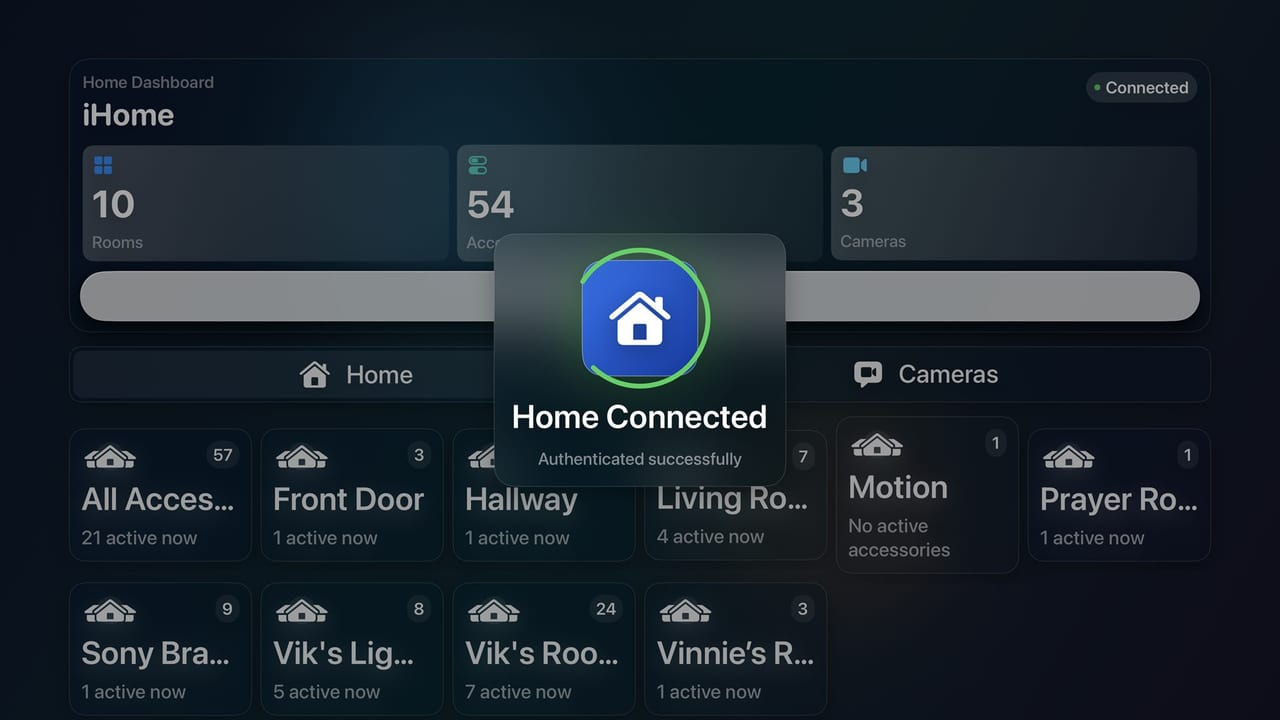
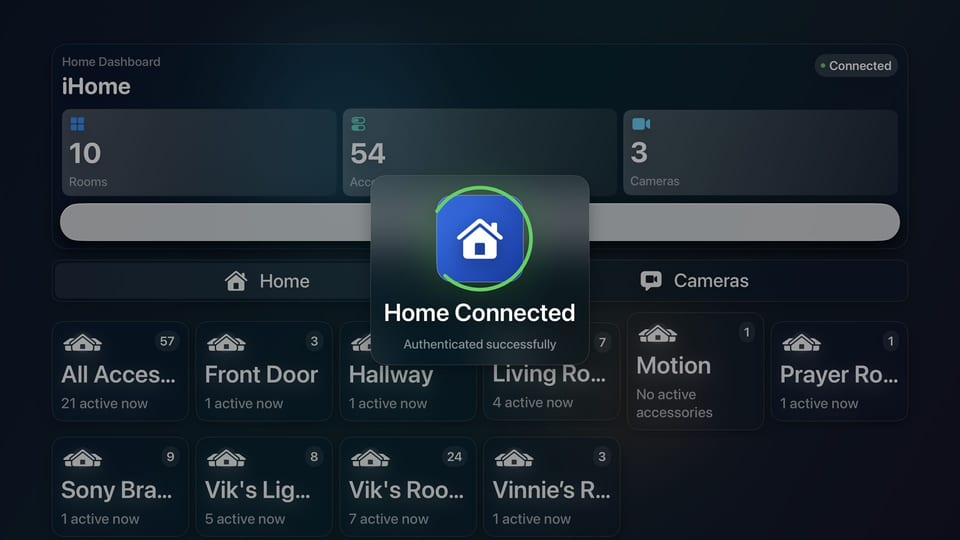
HomeonTV adds a control surface to tvOS.

Built from an Xcode project and shaped around the Apple TV remote, the app focuses on room navigation, accessory context, and real-time control.
Swift + tvOS HomeKit accessory routing Authorization-aware states Large-screen UI decisions
HomeonTV dashboard showing the project on a premium Apple TV style interface
HomeonTV dashboard
Remote-first architecture Navigation, focus management, and control depth are designed around tvOS constraints rather than borrowed from phone UI habits.
Accessory intelligence Power, brightness, volume, mute, fan speed, hue, saturation, colour temperature, and camera-related surfaces all feed into the experience.
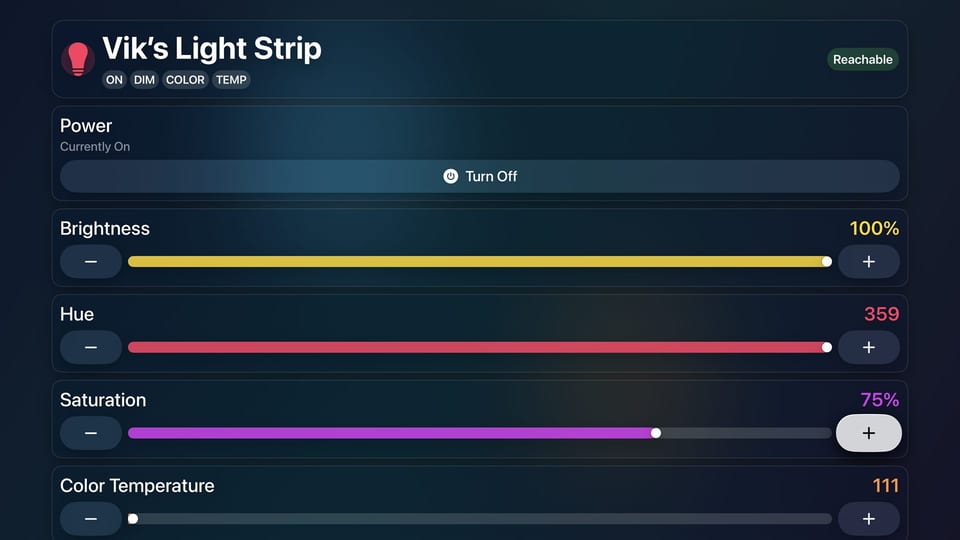
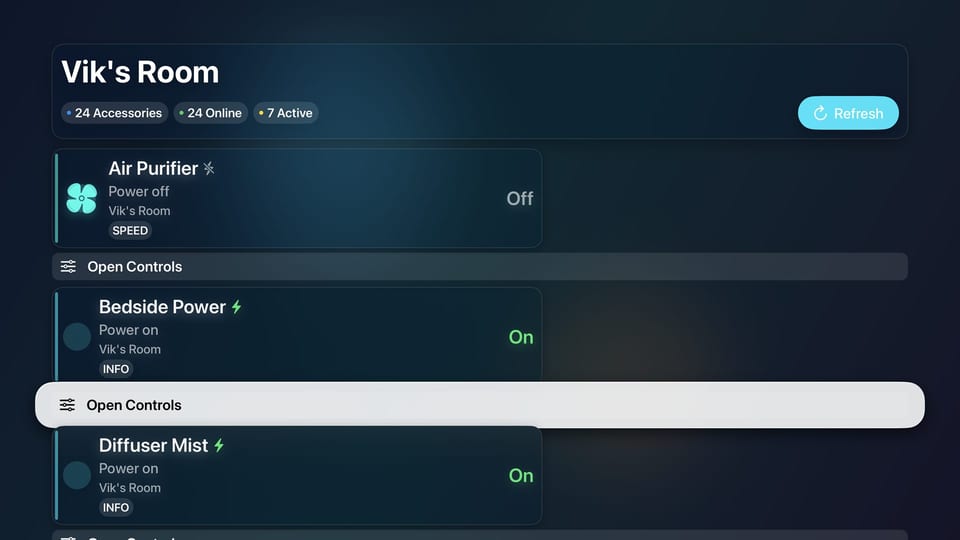
This scene covers a custom control surface for Apple TV, designed around the remote, home structure, and live control states.

tvOS implementation Accessory UX Custom project execution

This scene covers room switching, live status, and control depth arranged for readability on a television display.

Distance-readable UI Home context Responsive controls

This scene ties the interface work back to the systems underneath it: secure service exposure, practical cloud delivery, and real automations that make the environment useful outside a screenshot.

Cloudflare Pages Access control Automation workflow

This scene covers the working approach behind the build: secure defaults, clean diagnostics, maintainable fixes, and documented changes.

MSP delivery Networking and security Operational clarity

HomeonTV publish

HomeonTV

HomeonTV is the Apple TV project shown in the main walkthrough. The published repository is available on GitHub for the app structure, navigation model, and HomeKit-facing implementation.

Swift tvOS HomeKit Published on GitHub
HomeonTV dashboard on Apple TV
Repository: github.com/vikonkeys/homeontv

OpenWrt / NordVPN / per-device routing

Per-device VPN routing on OpenWrt without breaking the main LAN.

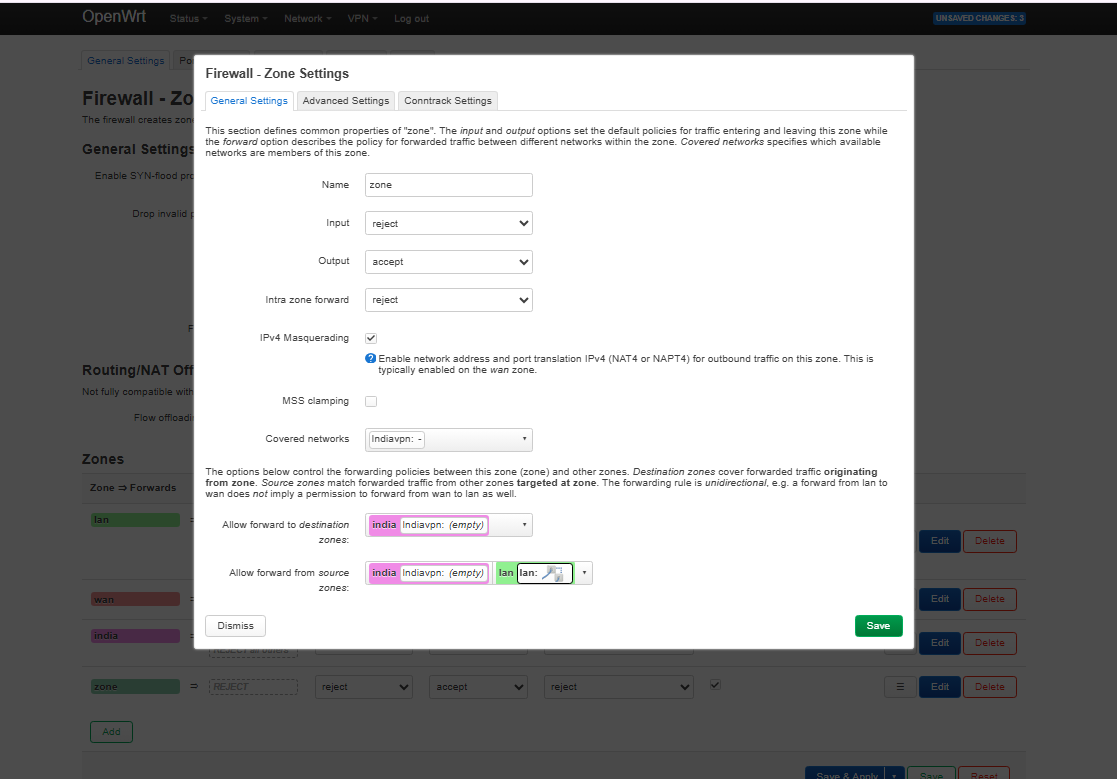
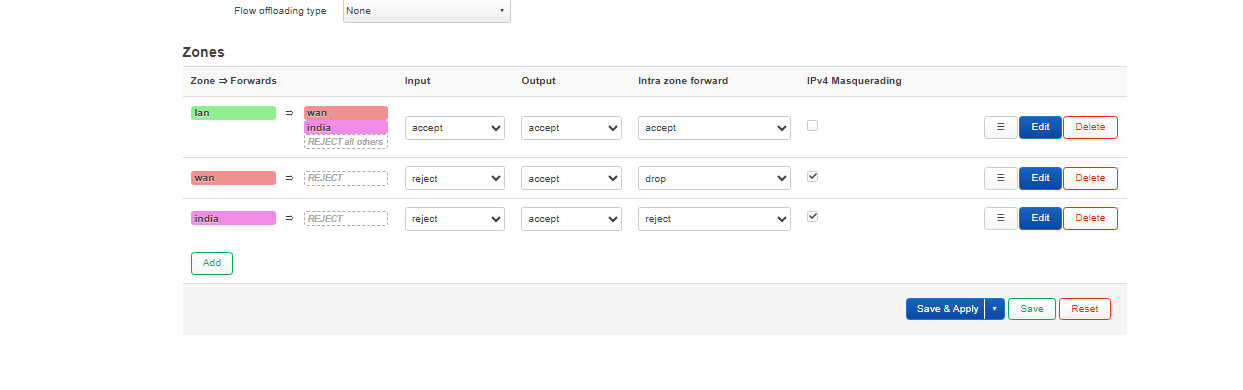
This build started as a NordLynx-style OpenWrt question and ended on the supported router path: a Nord manual OpenVPN profile bound to tun0, exposed through an unmanaged interface, then pinned to a single television with policy-based routing and a dedicated VPN firewall zone.

The result was a separate India-bound path for one client while the rest of the network stayed on the normal UK route. TV-side leak checks confirmed the tunnel was handling IPv4 and DNS correctly, and the remaining streaming block was traced to VPN exit-IP reputation rather than a local DNS or IP leak.

OpenWrt snapshot OpenVPN on tun0 Per-device kill-switch DNS and IPv6 checks
Routing model Indiavpn was bound to tun0, a dedicated india table carried the target host, and the TV kept its own path without hijacking the rest of the LAN.
Firewall posture Masquerading and LAN to VPN forwarding were handled in LuCI, with a per-device WAN block used as the kill-switch so the TV could not silently fall back to the normal exit.
Validation outcome Tunnel bring-up, public IP checks, DNS leak tests, and IPv6 checks confirmed the routing path was correct. The remaining streaming issue was provider-IP detection, not a misconfigured tunnel.

Published evidence is sanitized before display. Internal addresses, hostnames, and low-level config details are masked where they are not needed for the story.

VikOps script library

Windows and Linux maintenance snippets in one place.

This drawer groups the practical support snippets already used elsewhere on the site into OS-specific sections. The new Windows maintenance block was checked for PowerShell syntax and keeps its destructive scope limited to temp paths and standard maintenance commands.

PowerShell Bash
Windows DISM, SFC, cleanup, inventory

Windows repair pass

The original DISM and SFC recovery block stays here as the shorter integrity-first option when the goal is repair before broader cleanup.

# Cached thumbnail reset & DISM/SFC checks
Get-ChildItem "$env:userprofile\AppData\Local\Microsoft\Windows\Explorer" -Filter "thumbcache_*" | Remove-Item -Force
sfc /scannow
dism /online /cleanup-image /restorehealth
chkdsk C: /f /r
Stop-Process -Name explorer -Force; Start-Process explorer.exe

Windows maintenance pass

Run from an elevated PowerShell session. This pass updates third-party apps, cleans old temp data, trims SSDs, and prints startup and driver inventory without touching user files directly.

$ErrorActionPreference='Stop'

# 1) Update third-party apps
winget source update
winget upgrade --all --include-unknown --accept-source-agreements --accept-package-agreements

# 2) Component store cleanup (safe)
DISM /Online /Cleanup-Image /StartComponentCleanup

# 3) Prune temp files older than 7 days (safe; keeps fresh installers/logs)
$limit=(Get-Date).AddDays(-7)
Get-ChildItem "$env:TEMP","$env:WINDIR\Temp" -Recurse -ErrorAction SilentlyContinue |
  Where-Object { $_.LastWriteTime -lt $limit } |
  Remove-Item -Recurse -Force -ErrorAction SilentlyContinue

# 4) SSD/TRIM + consolidate free space
defrag /C /L /O

# 5) Show startup items so you can disable junk in Task Manager
Get-CimInstance Win32_StartupCommand |
  Sort-Object Name |
  Format-Table Name, Command, Location -AutoSize

# 6) Quick driver inventory (spot ancient third-party drivers)
pnputil /enum-drivers | findstr /i "Published Name Driver date Provider Name Class Version"
Linux Refresh, recon, and ZAP snippets

system-refresh

system-refresh wraps package repair, trim operations, Docker checks, and a logged summary into one Debian or Ubuntu maintenance pass.

#!/usr/bin/env bash
# system-refresh (Debian/Ubuntu + systemd)
set -u
set -o pipefail

LOG_DIR="/var/log/system-refresh"
TS="$(date +%Y%m%d-%H%M%S)"
LOG_FILE="$LOG_DIR/system-refresh-$TS.log"

: "${ENABLE_UPGRADE:=1}"
: "${ENABLE_DOCKER_CHECK:=1}"
: "${ENABLE_SMART_CHECK:=0}"

run_step() {
  local name="$1"; shift
  echo; echo "===== $name ====="
  "$@" || true
}

run_step "APT: update" apt-get update
run_step "DPKG: configure pending" bash -c 'dpkg --configure -a || true'
run_step "APT: upgrade" apt-get upgrade -y
run_step "Disk: fstrim -av" fstrim -av
run_step "Docker: disk usage" docker system df

echo; echo "Log saved to: $LOG_FILE"

Network reconnaissance

A simple host and port loop for Nmap plus Netcat, useful when a flat LAN needs a quick first pass before moving into more selective scans.

for ip in $(seq 1 254); do
  open_ports=$(nmap -p 1-65535 --open -T4 192.168.0.$ip | awk '/^[0-9]+\\/tcp[[:space:]]+open/ {print $1}' | cut -d/ -f1)
  for port in $open_ports; do
    nc -vz 192.168.0.$ip $port
  done
done

Web Recon with Zed Attack Proxy

Use OWASP ZAP on Kali Linux to spider an authorised public target and export the in-scope URLs it discovers.

Script excerpt
#!/usr/bin/env bash
set -euo pipefail

TARGET_URL="${1:-${TARGET_URL:-}}"
ZAP_BASE_URL="${ZAP_BASE_URL:-http://127.0.0.1:8080}"
OUTPUT_FILE="${OUTPUT_FILE:-./zap-urls.txt}"
ZAP_API_KEY="${ZAP_API_KEY:-}"

echo "Checking ZAP API at $ZAP_BASE_URL ..."
curl -fsS "$(api_url '/JSON/core/view/version/?')" >/dev/null || {
  echo "Could not reach the ZAP API at $ZAP_BASE_URL." >&2
  exit 1
}
View full ZAPscan.sh Expand script
#!/usr/bin/env bash
set -euo pipefail

# Discover URLs within an authorised target using the OWASP ZAP spider API.
#
# Usage:
#   ./ZAPscan.sh https://example.com
#
# Optional environment variables:
#   TARGET_URL    Target URL if no positional argument is supplied
#   ZAP_BASE_URL  ZAP API base URL (default: http://127.0.0.1:8080)
#   OUTPUT_FILE   Output file path (default: ./zap-urls.txt)
#   ZAP_API_KEY   API key if the local ZAP instance requires one

TARGET_URL="${1:-${TARGET_URL:-}}"
ZAP_BASE_URL="${ZAP_BASE_URL:-http://127.0.0.1:8080}"
OUTPUT_FILE="${OUTPUT_FILE:-./zap-urls.txt}"
ZAP_API_KEY="${ZAP_API_KEY:-}"

if [[ -z "$TARGET_URL" ]]; then
  echo "Usage: $0 https://example.com" >&2
  exit 1
fi

api_url() {
  local path="$1"
  if [[ -n "$ZAP_API_KEY" ]]; then
    printf '%s%sapikey=%s' "$ZAP_BASE_URL" "$path" "$ZAP_API_KEY"
  else
    printf '%s%s' "$ZAP_BASE_URL" "$path"
  fi
}

echo "Checking ZAP API at $ZAP_BASE_URL ..."
curl -fsS "$(api_url '/JSON/core/view/version/?')" >/dev/null || {
  echo "Could not reach the ZAP API at $ZAP_BASE_URL." >&2
  exit 1
}

echo "Starting spider for $TARGET_URL ..."
SCAN_ID=$(curl -fsS "$(api_url "/JSON/spider/action/scan/?url=${TARGET_URL}&recurse=true")" | sed -n 's/.*"scan":"\\([0-9]\\+\\)".*/\\1/p')

if [[ -z "$SCAN_ID" ]]; then
  echo "Could not start the ZAP spider." >&2
  exit 1
fi

while :; do
  STATUS=$(curl -fsS "$(api_url "/JSON/spider/view/status/?scanId=${SCAN_ID}")" | sed -n 's/.*"status":"\\([0-9]\\+\\)".*/\\1/p')
  [[ "$STATUS" == "100" ]] && break
  sleep 2
done

curl -fsS "$(api_url '/JSON/core/view/urls/?')" |
  grep -o 'https\\?://[^"]*' |
  sort -u > "$OUTPUT_FILE"

echo "Saved discovered URLs to $OUTPUT_FILE"

Raspberry Pi systems

Raspberry Pi infrastructure sequence

This sequence covers a Pi 5 baseline, VLAN-aware network segmentation, packet-level DHCP validation, and an ARM64 Active Directory join path linking Linux back into a Windows-centric environment.

Platform Pi 5, Debian 12, NVMe boot, multiple NICs
Focus Segmentation, DHCP services, identity, verification
Source Commands, logs, and validation traces

The base system already looks like infrastructure: Debian bookworm on a Pi 5, NVMe root storage, extra mounted volumes, and enough network interfaces to support routing and segmentation experiments cleanly.

Debian bookworm Pi 5 Model B Samsung NVMe root Layered storage

The Pi was turned into a VLAN-aware bridge with separate logical interfaces, DHCP ranges for multiple networks, forwarding enabled, and nftables handling the egress NAT path. It moved the design into a working routed service layer.

br0.10 and br0.20 dnsmasq scopes nftables masquerade Forwarding enabled

Packet capture confirms that clients on the VLAN-backed segment were completing the DHCP flow through the Pi. It takes the work from configuration into observed behaviour.

tcpdump on br0.10 DHCPOFFER DHCPACK Client lease record

Joining an ARM64 Debian system to Active Directory pulled Linux back into a Windows-centric environment using chrony for Kerberos timing, DNS pointed at the domain controller, and realmd plus SSSD for identity integration.

ARM64 Linux realmd and adcli SSSD Kerberos-safe time sync
vikops://raspberry-pi/projects

System notes

Raspberry Pi VikOps track

01 active scene of 04
01 • Pi 5 VikOps chassis Hardware and operating baseline
Pi 5 became the base system for network and identity work.

The rest of the work depends on a stable, inspectable base. The focus here is clear storage, temperature, interface, and OS visibility before more network complexity is introduced.

System inventory
Linux Pi5 6.12.25+rpt-rpi-2712 #1 SMP PREEMPT Debian
Debian GNU/Linux 12 (bookworm)
Raspberry Pi 5 Model B Rev 1.0
nvme0n1 PM991 NVMe Samsung 512GB
eth0 UP 192.168.0.5/24
eth1 UP 192.168.0.139/24
eth2 UP 192.168.0.86/24
vcgencmd measure_temp -> temp=53.2'C
Boot path NVMe-root setup with extra attached storage for VikOps data and application volumes.
Interface layout Multiple wired interfaces available before VLAN-aware bridging is introduced.
Operational signal Temperature and throttling checks confirm stable hardware behaviour under load.

Technical backend

Backend systems and service checks

This section covers the Pi, Cloudflare edge, Home Assistant, Scrypted, Homebridge, and related self-hosted services. It shows service checks, configurations, and validation notes.

Evidence Automations, bridge configs, edge checks, and hardening scripts
Style Sanitized snippets, live pulse, and operator-readable summaries
Scope Running services, checks, and selected internal details
vikops://backend/operations

Backend modules

Service modules

01 active surface of 05
Ops pulse Checking live posture...
Public services Awaiting snapshot
Protected route Awaiting snapshot
DNS posture Awaiting snapshot
Last check Standby
01 • Ops Pulse Live service and edge posture
Edge checks

I configured checks for Pages, R2 media, protected Access routes, DNS answers, and certificate posture. The values shown here come from the live production stack.

Live check snapshot
service=vikonkeys-pages status=healthy latency_ms=138
service=media.vikonkeys.com status=healthy cache=hit
tunnel=vikontls.cloudflareaccess.com status=protected route=up
dns=www.vikonkeys.com status=correct provider=cloudflare
tls=vikonkeys.com mode=edge-managed posture=clean
Source These values are drawn from the live production stack.
Scope The output is limited to the edge layer and excludes private service detail.
Checks The module shows site health and access posture in one place.
Access setup The Pi-side Cloudflared service runs as a daemon with a token file under /etc/cloudflared and restricted permissions.
Fetching current service checks...

tvOS Browser Deployment Surface

Built and deployed browser capability into a tvOS environment as a practical test of platform limits, packaging decisions, and reliable delivery on a device that was not designed for that workflow.

Home Assistant Webhook Automations

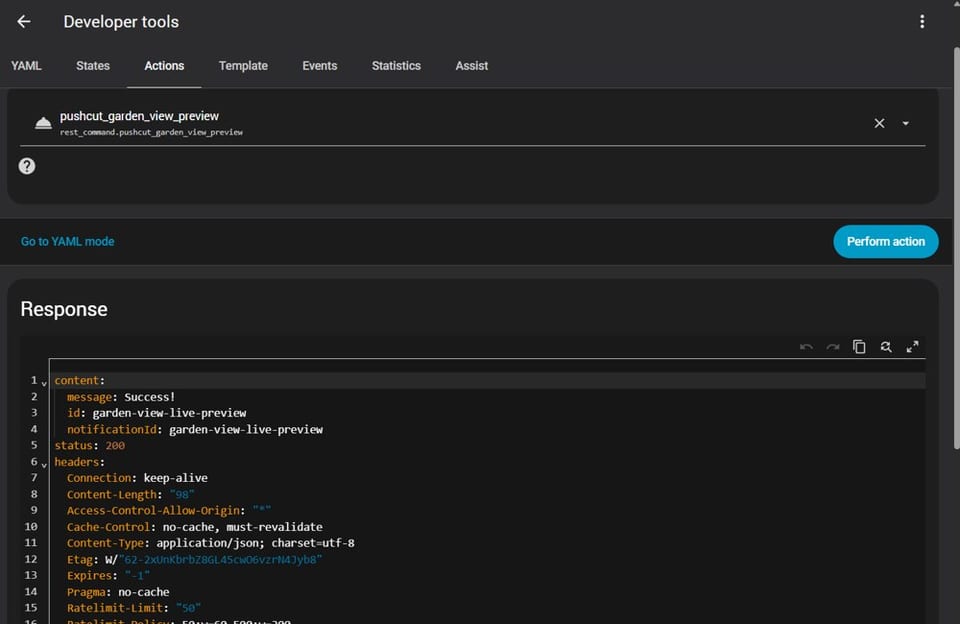
Built Home Assistant packages around Pushcut and REST commands so camera motion can snapshot, notify, deep-link into live views, and hand control back cleanly. The useful part is the flow design, state handling, and guardrails around each action.

Home Assistant Pushcut REST commands Webhook actions Snapshot triggers

Cloudflare One Access Surface

Used Cloudflare One to place identity-aware access boundaries in front of personal subdomains so private services remain reachable without being left open to the public internet.

Open Cloudflare Access

Support and Infrastructure Delivery

Hands-on work supporting Windows environments, Windows Server, device fleets, monitoring stacks, and end-user issues within an MSP setting.

Live Environment Lookup

This Cloudflare-backed diagnostics tool checks your public IP, browser, device, timezone, language, and available network metadata on demand, then shows the raw payload for anyone who wants to inspect the response.

Binary console active

Live environment snapshot

Checks your public IP, browser, operating system, device type, timezone, language, and any available country or ASN metadata using an edge-backed lookup.

Public IP Standby
Browser Standby
Operating System Standby
Device Type Standby
Timezone Standby
Language Standby
Country / ASN Standby

Contact Me

Messages are protected with Cloudflare Turnstile and delivered directly to my inbox. I usually reply within one to two business days.

Direct email: [email protected]